
The Free Video Title Generator: Turn a One-Line Idea Into a Title People Actually Click

Updated: Jul 1
Here's a pattern I see constantly. A creator spends six hours on a video - filming, re-filming, cutting it down, fixing the audio, color grading the thing until 1am - and then spends about eleven seconds on the title. They type whatever's in their head, hit post, and go to bed. Then they wake up confused about why a video they were proud of did 800 views.
What the Free Video Title Generator actually is
It's a free AI video title generator. You describe your video in plain English, and it hands you one clear best title plus two strong alternatives, instantly. That's the whole thing. No account, no credit card, no "you've used your 3 free credits" wall. You can run it a hundred times in a row and it won't blink.
It's powered by Claude AI on the backend, but the important part isn't the model - it's what the model was tuned to do. I trained and fine-tuned it by analyzing hundreds of title options, scoring systems, and the actual performance factors that decide whether a title earns a tap. I've spent 17 years doing this and have a stat line of hundreds of millions of followers and over 2 billion views to pull patterns from, including years inside one of the biggest car-content brands on the planet. All of that got baked into how this thing scores and picks titles. It is not a generic "write me 10 catchy titles" prompt. It's opinionated, and it's opinionated in the direction of what actually works.
How to use it (it takes about 20 seconds)
There are three steps and you can ignore one of them if you're in a hurry.
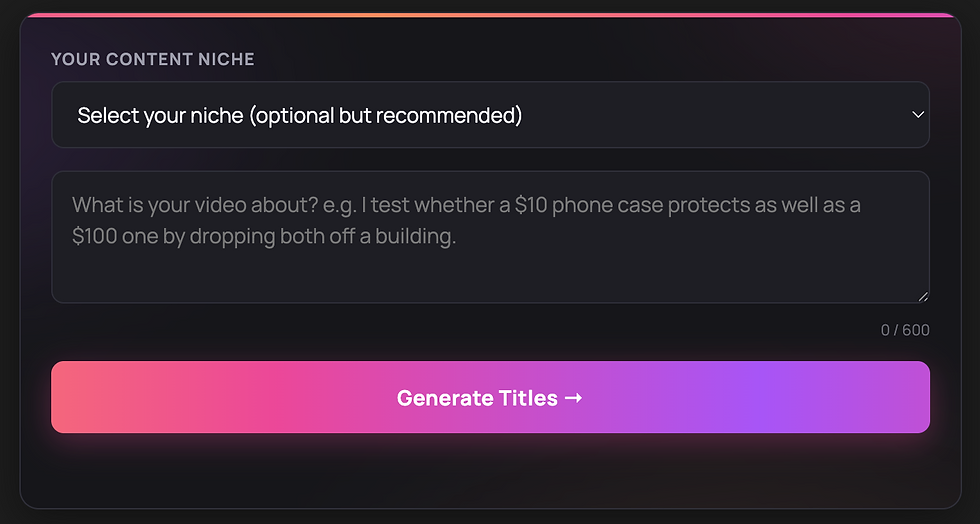
Step one: pick your niche. There's a dropdown with around 40 niches - Fashion, Beauty, Skincare, Fitness, Food, Travel, Cars, Tech, Gaming, Finance, Crypto, Business, Real Estate, Education, Self-Improvement, Comedy, and a load more. This is optional, but pick it. A great title for a finance video and a great title for a comedy video are not built the same way, and telling the tool your niche sharpens everything that follows.
It remembers your last-used niche too, so you only do this once if you mostly post in one lane.
Step two: describe the video. There's a text box, up to 600 characters, with a live counter. Write one or two plain sentences about what actually happens in the video. The placeholder example on the page is a good model: "I test whether a $10 phone case protects as well as a $100 one by dropping both off a building." Notice that's not vague. It names the thing being tested, the stakes, and the format. Give the tool that and it has something to work with.
Step three: hit generate. It thinks for a second (you'll see a "Writing titles with AI…" loading state), then returns your titles. If your description is empty or basically nothing - like four characters - it'll gently tell you to actually describe the video first. Fair enough.
That's it. You copy the one you like with one tap and you post.
What you get back
Three titles, ranked. The top pick gets a "BEST TITLE" badge and shows up bigger, because that's the one the tool is most confident in. The other two sit underneath as alternatives, and they're not throwaways - they're genuinely usable, just slightly different angles on the same video. Each title shows its character count, so you can see at a glance which ones are lean and which run long. And every single one has a one-tap Copy button that flashes "Copied" so you know it worked.
Why three instead of one? Because titling isn't math, it's a judgment call, and sometimes the "best" title by the numbers isn't the one that fits your brand or your thumbnail. Giving you a clear winner plus two strong alternatives means you get a recommendation AND a choice. You stay in control.

What's happening under the hood
Here's the part most people don't realize. When you hit generate, the tool doesn't just spit out the first three things that come to mind. It generates a batch of candidate titles, scores each one from 0 to 10 internally on how likely it is to earn the click, sorts them, and returns the best three. You never see the scores - you just see the ranking - but that scoring step is the whole reason the output is good. It's filtering, not guessing.
And what is it scoring on? Four things, which are the same four things that decide every title's fate whether a robot wrote it or you did.
Clarity. A viewer should understand your title in under a second. Clever-but-confusing loses to clear every time. If someone has to read it twice, you've already lost them.
Emotional pull. Curiosity, surprise, a bit of debate, a sense of adventure. A concrete subject and a strong superlative - "the best," "the worst," "the cheapest" - make people stop scrolling. Emotionally flat titles get emotionally flat results.
The right length. Cut every word that doesn't add meaning. Shorter usually wins. But a little extra length is fine when those extra words add real drama or detail, not filler. The tool is tuned to know the difference.
A sharp concept. A specific number, a head-to-head comparison, a bold claim, or a first-person feat ("I tried X for 30 days"). An angle people want to click, not just a description of what the video is.
How to describe your video so the AI writes a great title
The tool is good, but it's not psychic. Garbage in, garbage out applies. The difference between a weak result and a great one is almost always the quality of your description. A few rules:
Be specific about the hook, not the topic. "A cooking video" gives the AI nothing. "I make a 5-ingredient pasta that costs less than a coffee and looks like it's from a restaurant" gives it everything - the constraint, the surprise, the payoff.
Include the stakes or the twist. What's surprising, risky, expensive, cheap, fast, or unexpected about this video? That's the part a title can hang on. If your description has no tension in it, your title won't either.
Don't write the title in the description. You're describing what happens, not pre-writing the headline. Let the tool do the headline. People try to be helpful and basically feed it a mediocre title, and then it polishes a mediocre title instead of finding a better angle.
Use real numbers and comparisons if they exist. "$10 vs $100," "30 days," "5 ingredients," "I called 50 people." Numbers and comparisons are title gold and the tool will use them if you hand them over.
Where it fits and what it costs
Nothing. It's free, forever, no sign-up, no limit. It works for any platform you post video on - long-form YouTube, Shorts, TikTok, Reels, Facebook. The tool doesn't care where you're posting; a title that earns a click earns a click everywhere.
Once you've generated a few titles, you'll see a soft nudge toward two other things: my Crash Course, and The Creator Quest, my growth app, which includes a Premium Video Title Tester - a deeper tool that scores a title you already have rather than writing one from scratch. If you want to go further, those are there. If you just want free titles forever, take them and go. I genuinely don't mind.
A real example, start to finish
Let me show you the whole thing in action so it's not abstract.
Say you filmed a video where you eat at the single worst-rated restaurant in your city to see if the reviews are fair. If you titled that on autopilot at 1am, you'd probably type something like "I tried a bad restaurant" and move on. Flat. No stakes, no concept, no reason to tap.
Now run it through the generator properly. You pick your niche - Food & Cooking. You describe it: "I eat at the worst-reviewed restaurant in my city to find out if the 1-star reviews are actually fair or if everyone's being dramatic." Notice that description has tension baked in - a specific subject, a stake, a question the viewer wants answered.
The tool takes that and works it. It's not just rephrasing your sentence - it's pulling the strongest angle out of what you gave it and shaping a title around clarity, emotional pull, length and concept. You get back a clear best pick with the badge, plus two alternatives that lean on different angles - maybe one plays up the "is it really that bad" curiosity, another plays up the verdict. You pick the one that fits your thumbnail and your brand, copy it, and post. Total time: about 20 seconds, and you walked away with a title that has an actual reason to exist instead of a label nobody clicks.
That's the whole point. The quality of what comes out tracks the quality of what you put in, which is exactly why I keep banging on about writing a real description. Give it tension and specifics and it gives you a title with teeth.
Should you use the generator or write titles yourself?
Honest answer: both, and it depends on where you are.
If you've genuinely studied titling - you understand the four factors, you can spot a label versus a concept in your sleep, and you actually do the work on every post - then write your own and use the generator as a second opinion when you're stuck or want fresh angles. Even people who are great at titles get tunnel vision on their own video, and a tool that doesn't know what you intended will sometimes surface an angle you were too close to see.
But if you're like most creators - you know titles matter, but holding four factors in your head and brainstorming concepts for every single post is work you skip when you're tired - then let the generator carry it. That's the entire reason it exists. Knowing how to title and actually titling well every time you post are two completely different skills, and the second one is where everybody falls apart. The generator removes the "I'll just type something" failure point. It does the disciplined thinking even on the nights you don't have the energy to.
There's no shame in using the tool. The pros use tools. The amateurs wing it and wonder why their views are random.
A few pro tips to get more out of it
Generate more than once for the same video. The tool isn't deterministic in a boring way - run it twice and you'll get different angles to choose between. If the first batch doesn't hit, tweak your description to emphasize a different part of the video and go again.
Feed it the most interesting true thing, not the most obvious one. If your video is technically "a recipe video" but the actual hook is that it costs less than a coffee, lead your description with the cheap angle. The tool builds the title around what you emphasize.
And match the winner to your thumbnail. The title and thumbnail are a team. If your thumbnail already shows the "$10 vs $100" visual, you might pick the alternative that adds a different layer rather than repeating it. The tool gives you options precisely so you can make that call.
Frequently asked questions
Is the video title generator really free? Yes. Completely free, no sign-up, and no limit on how many titles you generate. Run it as many times as you want.
Which platforms does it work for? Any video platform - YouTube, YouTube Shorts, TikTok, Instagram Reels, and Facebook Reels. A strong title works across all of them.
How does it pick the best title? It generates a batch of options, scores each one out of 10 internally on clarity, emotional pull, length, and concept, then sorts them and shows you the strongest three. The one with the "BEST TITLE" badge is its top pick; the other two are equally usable alternatives.
Who made it and what's it powered by? It was built by me, Sergi Galiano - a social media expert behind hundreds of millions of followers and over 2 billion views - and it's powered by Claude AI, tuned on the title patterns that actually earn clicks.
Do I need to pick a niche? No, but you should. Picking your niche makes the titles match your audience instead of being generic. It only takes a second and the tool remembers your choice.
Will it write clickbait? No. The whole point is titles that earn the click honestly - clear subject, real emotional pull, sharp concept. Clickbait that doesn't match the video kills your retention and your channel. This is tuned to avoid that.
Can I use it for long-form YouTube videos, not just shorts? Yes. It works for any video - long-form YouTube, Shorts, TikTok, Reels, Facebook. A title that earns a click works regardless of length.
What if I don't like any of the three titles? Generate again, or tweak your description to emphasize a different angle of the video and run it once more. There's no limit, so you can keep going until one lands.
Stop losing great videos to lazy titles
You already do the hard part. You film, you edit, you post. The title is the cheapest, fastest lever you have, and it's the one most creators completely waste. A 20-second trip through the free title generator before you post is one of the highest-return habits you can build, and it costs you nothing.
Describe your video. Get your title. Post. Then go make the next one.
Remember, you can sign up for our free newsletter to stay up-to-date with my blog posts. If you want to take it a step further and level up your game, you can join our Creator Quest - our $25/month platform with Masterclasses, a Gamified Platform and Powerful AI tools trained by Sergi Galiano (www.howtogetmoreviews.com/creatorquest). Let’s get more views!
Let's get more views.
-Sergi Galiano


Comments